
Passport and ID photo online for your DNI, passport or visa
Choose the document and upload a photo or take one with the camera. We show you your fixed photo right away, with a white background and on a 10 × 15 cm sheet. Cropping it is free.
Sample photo · AI-generated portrait.
Upload a photo or take one with the camera: we'll show you right away how it looks.
or drag it here · paste it with Ctrl+V · JPG, PNG, WebP or HEIC, up to 15 MB.
- Document
- DNI (Spain)
- Size
- 26 × 32 mm
- Background
- White
- Resolution
- 600 dpi
Source: Ministerio del Interior · checked on 16 Oct 2026
The crop happens in your browser. To show you the fixed photo, we send it encrypted to our photo analysis service.
Two ways to get your photo
Crop and print
Free
A JPG photo at the exact size and a 10 × 15 cm sheet to print. The crop happens in your browser, no sign-up.
Checked photo
from€7.99
We check framing, head size, background, lighting and sharpness, and you see a watermarked preview before you pay.
- Photo without watermark at the document's size
- Print sheet in 10 × 15 cm, 13 × 18 cm or A4
- Download available for 24 hours
- Copy by email
- Full refund if the office rejects it for not meeting the requirements
Premium · €10.99: plus a person reviews your photo within 3 hours, a printable check certificate, 7 days of downloads and priority support.
Upload my photoYou see the result before you pay. You only pay if you want to download it.
- Secure payment with Dodo Payments. One payment, no subscription.
- Full refund if the office rejects the photo. See terms
- Questions before or after paying: support@approvavisa.com
Paso 1: Upload your photoSpanish DNI, passport or 130 other countries, each with its own size.
Paso 2: See your fixed photoWhite background, framing and check in moments, with the 10 × 15 sheet.
Paso 3: Crop it free or download itFree crop, or the fixed photo without a watermark for €7.99.
Before and after · Checked photo
Your photo from home, with a proper ID photo finish
We give your photo a white background, adjust the framing and check your document's requirements. All you have to do is upload it.
- Even white background
- Framing and size matched to your document
- Background, lighting and sharpness checked
€7.99 · You see the result before you pay.
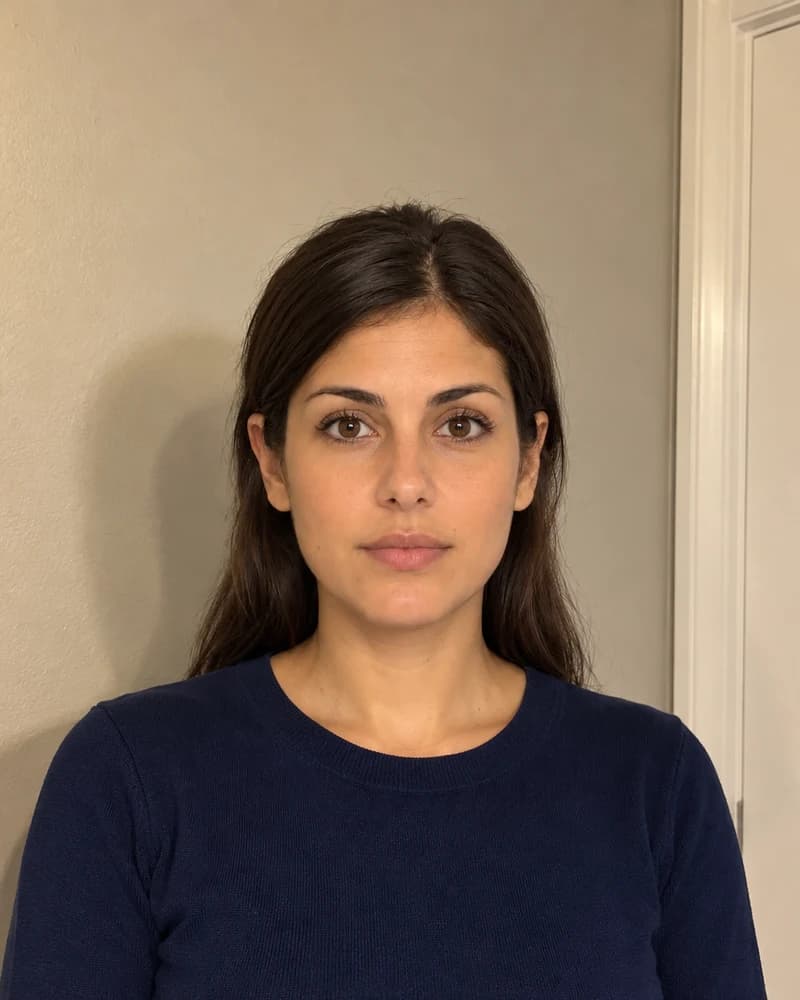
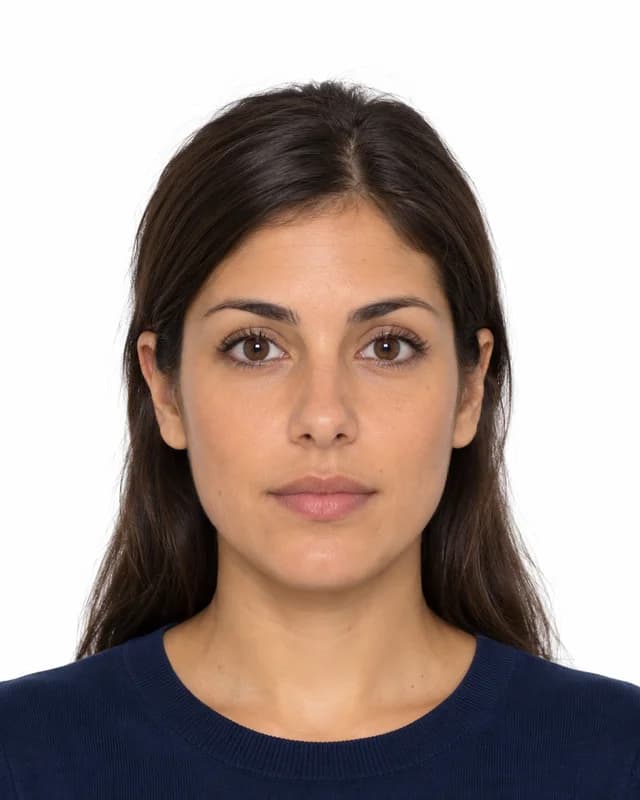
Illustrative example of the finish with AI-generated portraits.
What you get
The same files the tool produces, to scale. Example with the Spanish DNI photo.
614 × 756 px · 600 dpiTo upload online or take to print.
PNG · 300 dpi · also 13 × 18 and A4With thin cutting lines.
How to print it
At home or in a photo shop, on 10 × 15 cm paper, at 100% or “actual size”. Each copy measures 26 × 32 mm: check it with a ruler before cutting.
Sample photos · AI-generated portraits.
Photo sizes by document
Every document you can prepare here, with the size taken from the official source and the date we checked it.
| Document | Size | Background | Official source | Action |
|---|---|---|---|---|
| DNI (Spain) | 26 × 32 mm | White | Ministerio del Interiorchecked on 16 Oct 2026 | Make photo for DNI (Spain) |
| Passport (Spain) | 26 × 32 mm | White | Ministerio del Interiorchecked on 16 Oct 2026 | Make photo for Passport (Spain) |
| TIE (Spain) | 26 × 32 mm | White | Ministerio del Interiorchecked on 17 Oct 2026 | Make photo for TIE (Spain) |
| Driving licence (Spain) | 26 × 32 mm | White | DGTchecked on 17 Oct 2026 | Make photo for Driving licence (Spain) |
| Passport · Argentina | 35 × 45 mm | White | cancilleria.gob.archecked on 5 Oct 2026 | Make photo for Passport · Argentina |
| Visa · Argentina | 35 × 45 mm | White | eearb.cancilleria.gob.archecked on 5 Oct 2026 | Make photo for Visa · Argentina |
| Passport · China | 33 × 48 mm | White | bio.visaforchina.cnchecked on 5 Oct 2026 | Make photo for Passport · China |
| Visa · China | 33 × 48 mm | White | bio.visaforchina.cnchecked on 5 Oct 2026 | Make photo for Visa · China |
| Passport · Colombia | 30 × 40 mm | White | cancilleria.gov.cochecked on 5 Oct 2026 | Make photo for Passport · Colombia |
| Visa · Colombia | 30 × 40 mm | White | cancilleria.gov.cochecked on 5 Oct 2026 | Make photo for Visa · Colombia |
Showing 1–10 of 203 documents
Tips to get it right first time
What avoids the most rejections, according to each document's rules.
- Stand in front of a plain, light wall, at least half a metre away.
- Look for natural light from the front, for example facing a window. No flash.
- Look at the camera with your mouth closed and your head straight.
- Ask someone to take the photo at eye level, from the shoulders up.
- Take off sunglasses, caps and anything that covers your face.
- Use the original camera photo, not a screenshot or an image forwarded through a messaging app.
Guides and tools
Passport photo print templateFree
Several copies on a 10 × 15 cm or A4 sheet at real size.
Resize a photo to passport sizeFree
Crop to 26 × 32 mm or another size, in your browser.
Spanish DNI photo requirements
Size, background and what is and isn't accepted.
Passport photo requirements
What photo the Spanish passport needs and when you don't need one.
Frequently asked questions
Do you guarantee the photo will be accepted?
We can’t guarantee it: the decision always rests with the office processing the document. What we do is adjust the photo to the published size and automatically check the points that cause the most rejections, such as the background, framing and lighting.
When do I pay?
Cropping and printing are free. You only pay if you choose the checked photo and want to download it, after seeing the result and a watermarked preview.
Can I take the photo with my phone?
Yes. Any recent phone works. What matters is the light, a plain background and a photo taken facing the camera at eye level. We explain it step by step in how to take a passport photo with your phone.
Does it work for documents from other countries?
Yes. As well as the Spanish DNI and the Spanish passport, you can prepare photos for passports of other countries and visas for more than 130 countries, each with its own size.
What happens to my photo?
The crop happens in your browser. To show you the fixed photo and check it, we send it encrypted to our photo analysis service. If you’d rather it never left your device, use the passport size resizer, which only crops.
Where can I print it?
At home on photo paper, or at any shop or photo kiosk that prints 10 × 15 cm. Lay out the sheet with the passport photo print template and ask them not to crop or resize the image.